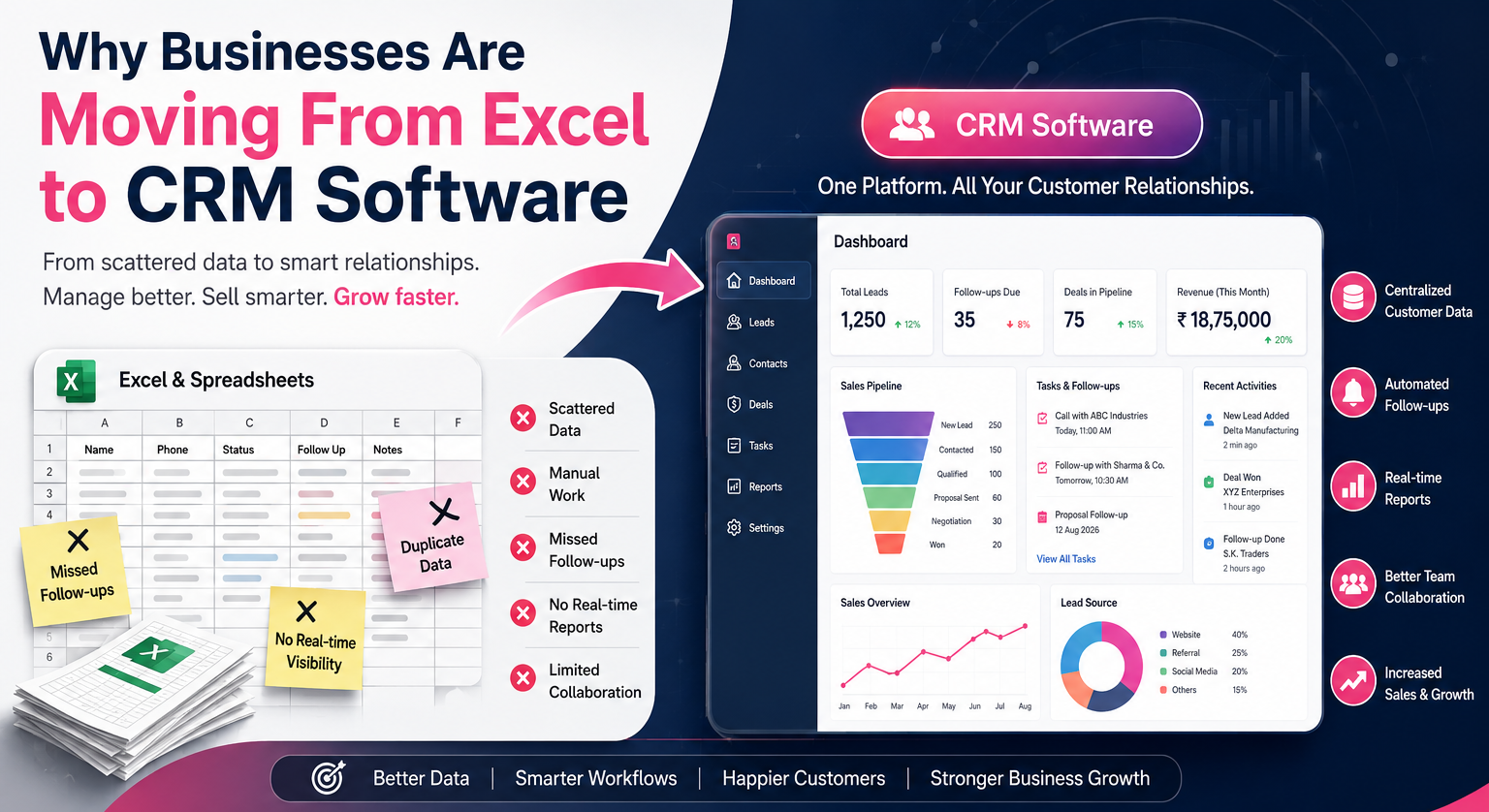
Why Businesses Are Moving From Excel to CRM Software
Why Businesses Are Moving From Excel to CRM Software
For years, Excel has been one of the most widely used tools for managing customer information, sales data, follow-ups, quotations, and business records. It is flexible, familiar, affordable, and easy to get started with.
But as businesses grow, managing customers and sales processes through spreadsheets can become increasingly difficult.
Multiple Excel files, duplicate data, missed follow-ups, manual reporting, scattered customer information, and limited collaboration can eventually slow down business operations.
This is one of the major reasons why businesses are moving from Excel to CRM software.
A Customer Relationship Management (CRM) system provides businesses with a centralized platform to manage leads, customers, sales activities, communication, follow-ups, quotations, reports, and much more.
The shift is not simply about replacing spreadsheets. It is about creating a more organized, automated, scalable, and data-driven way of managing customer relationships and sales operations.
What Is a CRM?
CRM stands for Customer Relationship Management.
CRM software is designed to help businesses manage their interactions with current and potential customers from a single platform.
Depending on the business requirements, a CRM can include features such as:
-
Lead management
-
Customer management
-
Sales pipeline management
-
Follow-up reminders
-
Task management
-
Contact management
-
Quotation and proposal management
-
Sales reporting
-
Communication history
-
Employee activity tracking
-
Email and notification automation
-
Dashboard and analytics
-
Document management
-
Customer support management
-
Integration with websites and other business applications
Instead of storing customer information across multiple spreadsheets, emails, notebooks, and applications, businesses can manage important information through one centralized system.
Why Businesses Are Moving From Excel to CRM Software
The transition from Excel to CRM is becoming increasingly common, especially among growing businesses that need better control over their sales and customer management processes.
Here are some of the major reasons behind this shift.
1. Customer Data Becomes Difficult to Manage in Excel
When a business has only a few customers, an Excel spreadsheet may be sufficient.
But imagine a company managing thousands of leads and customers.
Customer information may be spread across different files such as:
-
Leads.xlsx
-
Customers.xlsx
-
Sales.xlsx
-
Follow-ups.xlsx
-
Quotations.xlsx
-
Pending Payments.xlsx
This creates a fragmented data environment.
Employees may have difficulty identifying which file contains the latest information.
A CRM provides a centralized customer database where authorized employees can access relevant information from one system.
2. CRM Reduces Duplicate Data
Duplicate records are a common problem with spreadsheet-based customer management.
The same customer may be entered multiple times by different employees.
For example:
Customer Name: ABC Industries
Salesperson: Employee A
Phone: 9876xxxxx
The same customer might later be entered again by another salesperson.
This can lead to:
-
Duplicate calls
-
Duplicate emails
-
Conflicting information
-
Incorrect reporting
-
Poor customer experience
CRM systems can help businesses maintain cleaner customer databases and reduce unnecessary duplication.
3. Follow-Ups Are Easier to Track
One of the biggest challenges with Excel is managing customer follow-ups.
A salesperson may maintain a column such as:
Next Follow-Up: 10 August 2026
But if the employee forgets to check the spreadsheet, the follow-up can easily be missed.
A CRM can provide:
-
Follow-up reminders
-
Task notifications
-
Scheduled activities
-
Salesperson-wise follow-up lists
-
Pending activity dashboards
-
Automated notifications
This allows sales teams to focus more on customer interactions instead of manually checking spreadsheets.
4. Sales Pipeline Management Becomes More Efficient
Excel can store sales information, but it is not specifically designed to visually manage a sales pipeline.
A CRM can provide a structured sales pipeline such as:
New Lead → Contacted → Qualified → Proposal Sent → Negotiation → Won/Lost
Sales managers can quickly understand where each opportunity stands.
For example:
| Stage | Number of Leads |
|---|---|
| New Leads | 120 |
| Contacted | 85 |
| Qualified | 50 |
| Proposal Sent | 30 |
| Negotiation | 15 |
| Closed | 10 |
This gives management a clearer understanding of sales performance.
5. Real-Time Business Visibility
With Excel, managers often have to request updated files from employees.
This can create delays.
A CRM dashboard can provide real-time visibility into important business activities.
Management can monitor:
-
Total leads
-
New enquiries
-
Follow-ups due
-
Salesperson performance
-
Open opportunities
-
Won deals
-
Lost deals
-
Pending quotations
-
Revenue
-
Monthly sales
-
Customer acquisition
Instead of waiting for employees to prepare reports, management can access the information directly.
6. Better Team Collaboration
Excel files can become difficult to manage when multiple employees need to access and update the same information.
There can be issues such as:
-
Multiple versions of the same file
-
Incorrect updates
-
Accidental deletion
-
Data conflicts
-
Difficulty tracking changes
A CRM is designed for multi-user environments.
Different employees can work with the same customer database based on their permissions and responsibilities.
For example:
Sales Executive: Manage leads and follow-ups
Sales Manager: Monitor sales pipeline
Management: View reports and business performance
Admin: Manage users and system settings
This creates a more structured working environment.
7. Automation Saves Valuable Time
Excel requires employees to perform many tasks manually.
For example:
-
Enter customer information
-
Check the follow-up date
-
Create a reminder
-
Update sales status
-
Prepare a report
-
Send an email
-
Update another spreadsheet
A CRM can automate many of these activities.
For example:
New Lead Received → Lead Assigned → Notification Sent → Follow-Up Scheduled → Reminder Generated → Sales Status Updated
Automation can reduce repetitive administrative work and allow employees to spend more time on revenue-generating activities.
8. Better Reporting and Analytics
Excel can create reports, but preparing complex reports often requires formulas, filters, pivot tables, charts, and manual data preparation.
CRM software can provide ready-to-use dashboards and reports.
Businesses can analyze:
Sales Performance
-
Monthly sales
-
Salesperson performance
-
Product-wise sales
-
Region-wise sales
Lead Performance
-
Lead sources
-
Conversion rates
-
Qualified leads
-
Lost opportunities
Customer Performance
-
New customers
-
Existing customers
-
Repeat customers
-
Customer activity
This helps management make decisions based on actual business data.
9. Better Customer History
With Excel, customer information may exist in one file while communication history exists in emails, WhatsApp conversations, or separate documents.
This makes it difficult for employees to understand the complete customer journey.
A CRM can maintain a centralized customer history.
For example:
ABC Industries
-
First enquiry: 5 July
-
Called by sales executive: 6 July
-
Requirement discussed: 7 July
-
Quotation sent: 8 July
-
Follow-up: 12 July
-
Negotiation: 15 July
-
Deal closed: 20 July
When another employee takes over the account, they can understand the customer history without starting from scratch.
10. Improved Sales Accountability
CRM systems can make sales activities more transparent.
Management can track:
-
Who received the lead
-
Who contacted the customer
-
When the customer was contacted
-
What stage the lead is in
-
Which follow-ups are pending
-
How many deals were closed
-
Which leads were lost
This creates greater accountability within sales teams.
11. CRM Can Scale With the Business
Excel may work well for a small operation.
However, as the company grows, the volume of data and number of employees also increase.
A growing business may eventually have:
-
Hundreds or thousands of leads
-
Multiple sales teams
-
Several branches
-
Different departments
-
Large customer databases
-
Multiple sales pipelines
Managing all of this through spreadsheets can become increasingly complicated.
CRM software is designed to support growing organizations and can be expanded with additional modules and integrations.
12. Better Data Security and Access Control
Not every employee should have access to every business record.
For example, a sales executive may need access to customer information but should not necessarily be able to modify financial reports or system settings.
CRM systems can provide role-based access.
For example:
Admin → Full Access
Manager → Team and Sales Data
Sales Executive → Assigned Leads and Customers
Accounts Team → Billing and Payment Information
This provides businesses with greater control over sensitive information.
13. CRM Integrates With Other Business Systems
One of the biggest advantages of CRM software is integration.
A CRM can potentially connect with:
-
Website enquiry forms
-
Email systems
-
SMS platforms
-
WhatsApp solutions
-
Accounting software
-
Payment gateways
-
ERP systems
-
E-commerce platforms
-
Marketing automation tools
-
Customer support systems
For example:
Website Enquiry → CRM → Salesperson Assigned → Follow-Up → Quotation → Deal Closure
This creates a connected business workflow instead of isolated systems.
14. Better Lead Management
For businesses that generate leads through multiple channels, managing enquiries in Excel can become challenging.
Leads may arrive through:
-
Website
-
Google Ads
-
Social media
-
Email
-
Phone calls
-
Online marketplaces
-
Referrals
-
Events
-
Sales representatives
A CRM can bring these leads into one centralized system.
Businesses can then categorize leads based on:
-
Source
-
Location
-
Industry
-
Requirement
-
Salesperson
-
Lead status
-
Priority
This makes lead management significantly more organized.
15. Better Customer Experience
CRM is not only about internal management.
It can also improve the customer experience.
When employees have access to accurate customer information, they can provide faster and more relevant responses.
Instead of asking customers repeatedly:
“Can you please tell us what you discussed with our sales team?”
the employee can review the customer history and continue the conversation.
This creates a more professional customer experience.
Excel vs CRM: What Is the Difference?
| Feature | Excel | CRM Software |
|---|---|---|
| Customer Database | Basic | Centralized |
| Lead Management | Manual | Structured |
| Follow-Up Reminders | Manual | Automated |
| Sales Pipeline | Limited | Dedicated |
| Reporting | Mostly Manual | Automated Dashboards |
| User Permissions | Limited | Role-Based |
| Customer History | Difficult | Centralized |
| Automation | Limited | Extensive |
| Integrations | Limited | Multiple |
| Scalability | Limited | High |
| Team Collaboration | Can be difficult | Built for collaboration |
| Activity Tracking | Limited | Detailed |
| Notifications | Manual | Automated |
Does This Mean Businesses Should Stop Using Excel?
Not necessarily.
Excel is still an excellent tool for many business activities.
It can be useful for:
-
Financial calculations
-
Data analysis
-
Quick reports
-
Budgeting
-
Small datasets
-
Temporary data management
-
Custom calculations
The issue is not that Excel is bad.
The issue is using Excel as the primary system for managing complex customer and sales operations as the business grows.
For many businesses, the ideal approach is to use both Excel and CRM software where appropriate.
When Should a Business Move From Excel to CRM?
There is no fixed number of employees or customers that determines when a company needs CRM software.
However, certain signs indicate that the business may have outgrown spreadsheets.
You should consider CRM software when:
-
Leads are being missed.
-
Salespeople forget follow-ups.
-
Customer data exists in multiple spreadsheets.
-
Management cannot easily see sales performance.
-
Employees maintain separate customer lists.
-
Duplicate customer records are increasing.
-
Preparing reports takes too much time.
-
Sales activities are difficult to track.
-
Customer history is scattered across different platforms.
-
The company is expanding its sales team.
-
Business processes are becoming increasingly manual.
If several of these problems exist, it may be time to consider moving from Excel to CRM.
CRM Is More Than Just Software
The transition from Excel to CRM should not be viewed simply as a software upgrade.
It is a shift in how a business manages information and operates its sales process.
Instead of:
Data → Spreadsheet → Manual Follow-Up → Manual Report
businesses can move toward:
Lead → CRM → Automation → Follow-Up → Sales Pipeline → Analytics
This creates a more structured and measurable business process.
How AI Is Taking CRM to the Next Level
Modern CRM systems are increasingly incorporating Artificial Intelligence.
AI-powered CRM solutions can help businesses with:
-
Lead scoring
-
Sales forecasting
-
Customer segmentation
-
Automated follow-ups
-
Email generation
-
Customer behaviour analysis
-
Sales recommendations
-
Predictive analytics
-
Chatbots
-
Automated data entry
-
Lead prioritization
For example, an AI-powered CRM can analyze previous customer interactions and identify leads that are more likely to convert.
This allows sales teams to focus their time on high-value opportunities.
The future of CRM is therefore moving beyond simply storing customer information toward helping businesses understand what action they should take next.
Custom CRM vs Ready-Made CRM
Businesses also need to decide whether to use an existing CRM platform or develop a custom CRM solution.
Ready-Made CRM
A ready-made CRM can be useful when the business requires standard features such as:
-
Lead management
-
Customer management
-
Sales pipeline
-
Tasks
-
Reports
-
Follow-ups
It can usually be implemented relatively quickly.
Custom CRM
A custom CRM may be more appropriate when a business has unique workflows or industry-specific requirements.
For example, a manufacturing company may need:
-
Dealer management
-
Enquiry management
-
Production coordination
-
Sales order management
-
Dispatch tracking
-
Payment follow-ups
-
Customer-specific pricing
A custom CRM can be designed around the company's existing processes instead of forcing the business to change its workflow around generic software.
Final Thoughts
Excel has played an important role in business management for decades, and it remains a valuable tool.
However, when a company starts handling large numbers of leads, customers, employees, follow-ups, and sales activities, spreadsheets can become difficult to manage.
CRM software provides a more centralized and automated approach to customer relationship management.
It can help businesses:
-
Organize customer information
-
Improve lead management
-
Reduce missed follow-ups
-
Track sales activities
-
Automate repetitive processes
-
Improve team collaboration
-
Generate better reports
-
Increase accountability
-
Improve customer experience
-
Make data-driven decisions
For businesses looking to scale, the question is no longer simply “Excel or CRM?”
The more important question is:
“Is our current system capable of supporting the way our business wants to grow?”
If the answer is no, moving from Excel to a CRM may be the next important step toward building a more efficient, connected, and scalable business operation.